Showing posts with label Bridge. Show all posts

Monday, March 30, 2020

Sharing a cache in Adobe Bridge

Using Adobe Bridge as a means of archiving and accessing a digital asset library accessed by multiple users has always been a somewhat clunky affair. Each time the library was updated, users had to update their locally stored image cache.  Well, no more!

If you're using the latest version of Adobe Bridge you're in luck -- multiple users can now share caches which reduces lag time in accessing images and also reduces hard drive space on each machine. Just go to Tools>Cache>Manage Cache.

To learn all about sharing the cache in Bridge visit the Adobe website.

Note: for users of Adobe Bridge CC 2018 and earlier you're stuck with the old method. Sorry.


Sunday, March 29, 2020

Adobe Bridge new caching system

The caching system used by Adobe in its image asset manager Bridge is the very heart of the program. If you don't understand it thoroughly you should, and if you do, well, now is the time to take a look at the changes they have made in the latest iteration of Bridge.

For me, one of the most disconcerting aspects of the latest version is its attempt to want to purge and/or optimize the cache. In older versions you had to do this manually, but now it can actually be set to perform the task regularly. And if you use Bridge to archive lots of photos this could spell real trouble. Unless, of course, you have have the latest version of Bridge which allows you to export/share/import caches.

You find the cache details in Preferences: Bridge>Preferences>Cache. That should also give you the precise location of the cache file(s) on your machine.

Anyway, be extra-careful and be sure to check out Adobe's website for more information on the cache, purging it and optimizing the cache in Bridge.

I'll deal with the new sharing cache feature in tomorrow's post.


Wednesday, February 10, 2016

Adobe Bridge Output module error

If you've updated Bridge to 6.2 on the Mac and are running Yosemite then you might receive the "I/O Error" when attempting to create a PDF.

If so, you will need to update your AOM (Adobe Output Module). You can find the necessary download link and instructions on Adobe's website or you can cut-and-past the url:

https://helpx.adobe.com/bridge/kb/install-output-module-bridge-cc.html

And voila!

Be well.

Tuesday, July 9, 2013

Bridge references acting oddly on my PC

I'm using Bridge CS5.1 (part of CS5.5), on a Windows 7 HP. Some weeks back I first began to notice that I had to reset my preferences every time I launched Bridge.

So, I tried tossing the Preferences file (using a google recommendation) but that didn't work.

Next, I had our IT department completely reinstall CS5.5, including Bridge, but that didn't see to work either. 

One other thing, perhaps unrelated, but my cache remained untouched. I thought that odd only because when we've reinstalled in the past, I had to completely reindex the library. That does not seem to be the issue with this latest reinstall.

Any thoughts?

Wednesday, June 26, 2013

Corrupted Preferences in Bridge? Try this and let me know if it works!

If you find your cache has become corrupted or otherwise unresponsive or damaged, Adobe's fix is pretty straightforward: go to Preferences and simply purge the cache.  (Of course, you'll have to reindex all your folders/filers.)

But if you find your Preferences themselves have become corrupted, it's a bit more challenging to find a solution to "reset" your preferences to the factory defaults. Here's what you do:
  1. Quite Bridge 
  2. Relaunch the program
  3. Immediately hold down Control-Alt-Shift (PC) or
  4. Command-Option-Shift (note if this doesn't work and for older versions of the Mac OS
I have to say, though, this did NOT work for me -- I suspect I would have to reinstall Bridge at some point. But that would mean a total reindex of our image library. I think not.

I'd be curious to know if this works for anyone else.

Thursday, February 21, 2013

Speed up your indexing in Bridge

If you find yourself having to reindex/recache an extremely large image library (like ours), here's a handy tip to get you back in search mode fast.
  1. Launch Bridge
  2. Make sure Path Bar is visible (if not, go to Window>Path Bar).
  3. On the right side of the Path Bar, just to the left of the Star rating drop-down menu are two square icons. These allow you to modify the thumbnail quality and preview generation in Bridge. 
  4. Select "Prefer Embedded (Faster)".
  5. Voila!
It might take a few moments when you select an image to generate a preview and if you find this too annoying you can change it back to "Always High Quality" or even  add "Generate 100% Previews" although this will consume lots more disk space and of course take more time in caching/indexing)

Tuesday, February 12, 2013

Handy introduction to using Adobe Bridge to organize your photos

I found this handy little video tutorial for using Bridge (CS6) as way to organize your photos. If you're looking for a tool to organize your image library it's worth the 13 or so minutes running time -- and it's free with Creative Suite, too, which is nice.


Monday, February 11, 2013

Bridge CS6 New Feature: showing InDesign Linked Files

A second tres cool feature of Bridge CS6 is its ability to show those often hard-to-locate linked InDesign files.

Just navigate to the folder where the IDD document is located and select the document. (You should see a little "link" icon in the upper right corner.) Now make sure you have checked to show "Linked Files" in Preferences and voila1 there's the file list.


OK, now right- or control-click on the IDD doc, and you should see the following dropdown:


Select "Show linked files":


Bingo! No matter which folder they're in, there they all are:


Finally, if you have checked the "Color Swatches" and "Font" panels in Metadata Preferences, and then select any IDD doc, you'll be able to see at a glance which fonts and what colors are use din the document itself -- another very nice feature:


Tuesday, February 5, 2013

Bridge CS6 New Feature: IPTC Extension Panel

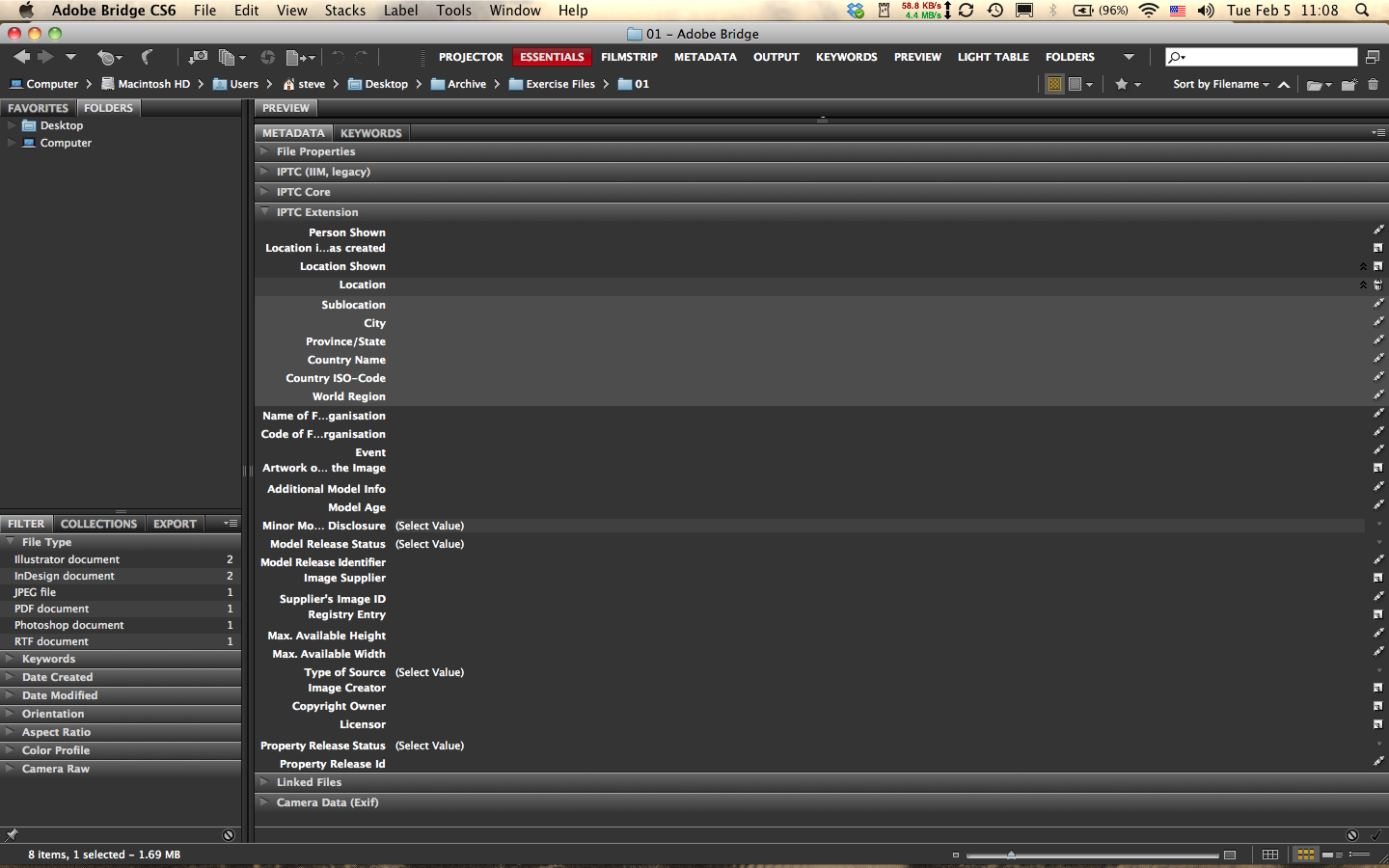
While little has changed between Bridge CS5 and 6, there are a couple of features in the latest iteration that will appeal to the serious archivist. The first is the new IPTC Extension Metadata Panel. Available as a download in CS5, this panel has now been fully integrated with the panel hierarchy in CS6. This new feature's importance is immediately obvious as soon as you open the panel (make sure it's checked in the Preferences): it adds a significant amount of data fields that will certainly appeal to professional photographers and image librarians.

Some of the fields can be expanded and even multiplied.

For example, in the image below I clicked the little "new page" icon on the far right side of the panel on the line "Location" and it added a set of subfields. The cool thing is I can click again and again and it will add additional fields. To delete one of the fields you added, simply click the trash icon. Voila!


Another interesting aspect of this new panel is the built-in dropdown menus for several data fields that have been increasingly important in the era of digital photography; fields such as

model age disclosure information:


model release status:


type of source:

and property release information (my favorite here):

Next: my second favorite new feature, a metadata panel for linking to InDesign files and a bonus!

Saturday, October 20, 2012

Sharing collections in Bridge?

"Bridge Booster" claims that we can now share collections, at least in the latest iteration of Bridge.

Here's his comment on an earlier post here:

You can share regular Collections in CS5 for images stored on a server that other users have access to. You can just copy the .filelist file from /Users/username/Library/Application Support/Adobe/Bridge CS5/Collections and paste it into the other users Collections folder and relaunch Bridge. This will not work for local files. Please note that there is a bug in CS5 Collections where any file names or folder names that use an apostrophe will cause the Collection to not list any files after that file. If you search on the Adobe forums you can find a script to fix the Collections file and replace the apostrophes with the proper characters (%20 I think).

So far I haven't been able to test this out yet -- can anyone confirm this?

Thursday, October 18, 2012

DO NOT UPGRADE TO BRIDGE CS6

OK, sorry for the uppercase scream in the title but Ive recently upgraded to CS6 and learned that the latest iteration of Bridge has at least one VERY SERIOUS bug buried in the program's bowels.

When indexing a folder, in this case a mixture of 793 jpgs and tiffs, the program extracts all the existing metadata (keywords and the like) but appears to hang up with extracting the thumbs and apparently the previews as well.

In the lower left corner of the program where the number of items and extracting progress is found, the item numbers shows up but the extracting process is interminable. By that I mean that the number of thumb extractions decreases but  before finishing goes back up again, then down and then back up and so on. And if you try to resize the window during this process it will happen with a larger swing in number differentiation.

Note that the settings and preferences are the same used in CS4 and CS5.

I googled the issue and sure enough this problem has been identified on the Adobe forum site (http://forums.adobe.com/message/4500258) but there doesn't appear to be any clear-cut answer at this point --  it is a cross-platform issue as well.

If anyone has an answer or possible solution please let me know and I'll post it for them right here.

Final note: there doesn't appear to be any reason to upgrade to Bridge CS6 anyway, no cool new feature or enhancement (such as easily sharable collections) worth the hassle.

One final note, and a curious one as well: the Bridge and Mini Bridge icons are missing from Photoshop CS6. Coincidence? I hope so. . .

Monday, July 9, 2012

Cache workaround if you have to update/upgrade Bridge

Upgrading your present version of Bridge will require a completely new cache for your image library. (Indeed, each version of Bridge is cache specific.) If you need the latest version of Bridge to help keep up with your design teams but don't want to have to completely reindex your image library there is one reliable workaround: Don't do it.

OK, what I mean is keep your "old" version of Bridge and use that for all your searching needs -- you're already indexed. After all, the latest version probably won't make a significant difference for searching. You can still upgrade, of course, just don't overwrite your old copy of Bridge.

That way you can take your time and grow the next copy of your cache with the latest version, at your own pace -- if you wish.

Tuesday, February 21, 2012

From Wikispaces - LoneLibrarian

This note was too good not to pass along to the readers here. LoneImageLibrarian has done her homework and it's worth sharing.

"I've been playing with Lion OS, as well as full versions of Portfolio, Filemaker Pro 11, and the old Bridge standby recently and had some interesting details to report. Lion OS has more bugs to it than I originally noticed; we'll call it blindly wanting to see the best in something even when it isn't there. Snow Leopard is continuing to be used office wide to avoid some hiccups with our printer-from-the-future, so that is a hurdle for later down the line. While Lion is not necessarily the savior we all hoped for, there are other options on the purchased horizons. Filemaker Pro 11 sounded like such a good idea in the literature, but what doesn't? The Photo Catalog section comes with templates for getting database level organization underway, which look excellent and pretty. In practice, however, the no-manual new-user experience of this supposedly beginner level appropriate feature is not user friendly in the slightest. I am no green kid when it comes to computers and tend to find my feet just from using a program. The overall response of the office to Filemaker Pro 11, even outside of our digital images needs, has necessitated the purchase of The Missing Manual book on Filemaker Pro 11 to move ahead in just testing it out.

"Portfolio is proving to be a nice image-tagging and organization option, though one has to categorize the correct metadata to embed as IPTC to have it searchable both within Portfolio as well as Spotlight. For budget purposes, however, Bridge still encompasses the full package of features. Portfolio 8 for the individual experience has a pleasant user interface and is rather pretty and oddly tactile, but the expense is certainly off-putting. For those who are not intimidated by many-paned, institutionalized programs, Bridge is thus far still the best cost-effective image cataloging software. More news to come from the front as more images are processed."

Lots of food for thought and all worth digesting. Stay tuned sports fans!

Wednesday, January 25, 2012

Searchin in Bridge: Spotlight or Bridge's Search?

Inspired by a recent online posting by Lone Digital Librarian (on our wikispaces discussion page) talking about the new Mac OS Lion and the potential search features in Spotlight, I ran a test using Snow Leopard (which is what I have on my Mac).

Assuming your image library is fully indexed in Bridge, here's what you might find. I navigated to the little Spotlight search box in the upper right corner of Bridge and typed in a word (and only one word), "classroom." A few minutes later I had my search results, and it wasn't pretty.

Now I had run tests using Spotlight early on in this project and knew that the search feature was weak to say the least. This time I learned something else, where the limitation rests. Apparently when you type in a word it searches for the word in filenames and keywords and will return those images tagged accordingly. This does not appear to be adjustable.

Oh, and if you type in a word followed by a comma and a second search criterion, Spotlight from within Bridge will search for that combination (i.e., word, comma, word). Not good either.

Tuesday, January 24, 2012

Lightroom or Bridge?

Adob Photoshop guru Julieanne Kost discusses the pros and cons of using Bridge or Lightroom

Tuesday, January 17, 2012

A window into Bridge's limits - or the corrupt cache issue, again

Well, it happened again: the dreaded “Bridge has a problem reading the cache. Purge the central cache.”


This has now happened twice on the G5 tower (my primary benchmark machine). Both times the cache had reached nearly identical size: 44gb, 364k+ items. the first time and 43gb, 352k+ items the second time.

Although a pattern seems to be emerging, it should be noted that the third time this happened was on my Macbook Pro and the size was somewhat smaller: 40gb, 298k+ items.

While we can't determine what this means with any degree of certainty, it just might indicate what the top end limits are in using Bridge.

Still. . . it pays to watch your cache levels carefully and optimize as needed (command/control + K in Bridge preferences)

Sunday, January 8, 2012

Which image archiving option to use? part 2

In my last post I started reproducing a dialogue that began as a series of comments between myself and a reader but on an older post. The dilemma "Anonymous" raised, over which image archiving tool is the best, affects more than just the two of us and our respective organizations.

Any suggestions or comments you might have by all means jump into the conversation!

I have included the latest reply from Anonymous (January 6) as well as my response:

I've had some time to actually discuss a bigger picture of what's going to be needed with the department professionals and the list of needs has left me a bit concerned that we may need something made? Keep in mind this is a for-profit company. I'm not too certain about what product could achieve all of the following:
  1. -Intranet systems for internal information use
  2. -Simple template input portal for uploading, labeling, and tagging images.
  3. -Database look ups for linked images across multiple programs (ex: inDesign)
  4. -Simple search portal to narrow down images and permit more in the way of browsing capabilities.
  5. -Use of multiple search terms for searching directly.
  6. -A bulk file rename utility.
  7. -There is also a want for something like an OPAC for use within the company to find both images and books within the company library.
Again, I'm not sure if something like Asset Bank or Portfolio Server can come up to this level of complex organization, mixed with the simplicity of input and search needed at this particular location.

It is also important to note that I am a staff of one for this particular function, with limited programming history and a Mac OS to work around. 


Like you, I'm a staff of one with limited technical background and although I use both a PC and a Mac as benchmark machines to maintain the library, virtually everyone else with access to the library uses a Mac.

Looking over your bullet list above, I would have to say that, with a couple of possible exceptions, Bridge can pretty much accomplish all those tasks.
  1. We use it on a network
  2. Photo downloader is a handy little tool for importing and applying metadata templates to images straight from a camera or memory card
  3. While it's not a database, Bridge can certainly search across various file formats -- if I understand you correctly
  4. It's search features are pretty easy to use -- of course much depends upon the keywording and search strategies developed to access images in the library - I do agree that bridge has limitations here to be sure
  5. Bridge's search features are quite robust and allow for multiple metadata searching
  6. Bridge CS4 has a handy bulk renaming feature, which has been significantly enhanced in CS5
  7. I'm a bit unclear here on exactly what you have in mind here -- but again, if the "book" is in a file format that can be tagged and if the item has been tagged properly, Bridge should be able to find it.
Of course, I want to emphasize again that Bridge has some very serious limitations. And those limitations are most readily experienced in setting up and maintaining a large image library.

Having said that, the key deciding factor for our organization -- and from conversations I had with other readers here I sense we're not alone -- the key factor is cost. Bridge is free (or nearly so). And there's also the learning curve: many designers, for us the most likely users of an image library, have some familiarity with the software already.

OK, so any thoughts?

Saturday, January 7, 2012

Which image archive option to use?

I've had a running conversation with a reader on one of my older blog posts about the dilemma we all face in trying to come up with the right option for creating and using a large image library. Since the issues raised touch at the very heart of what many of us are faced with, I thought I would share them.

January 4 Anonymous asked: In your opinion, would a product like Extensis Portfolio work as an extension of Adobe Bridge? 

My response: On the face of it yes, Bridge can pretty much function as an extension of any database cataloging program.

Are you planning on sharing your image library among multiple users? If so, I believe Extensis Portfolio has a number of limitations in that regard -- they want multiple users to upgrade to their vastly more expensive Portfolio Server system I suppose).

Still, using a browser program like Bridge with a DB program like Portfolio in tandem should not be ruled out.

For example, I use Adobe Lightroom 3 as a file verification tool for our school's digital image library. But since no one else has the program we can't share catalogs -- which would be ideal, of course.

Anyway, you can use a program like Portfolio along with Bridge but I would suggest you test out the metadata copying and synching between the two programs. thoroughly before making any serious commitment.

Ultimately, though, I might suggest you go with one or the other and reduce your workflow while keeping your costs reasonable and making your life simpler. 


Anonymous said: Well, I have a large volume of images (100,000+ with new ones daily/weekly) in a corporate setting where the images need to be accessible to over 20 people. We're working with macs, so I'm trying to find something simple that performs a better search than spotlight or the bridge program itself. I was considering Asset Bank as another option to work within our server, since we don't need to make the images accessible to clients or the public. These were the package options I'd seen. http://www.assetbank.co.uk/product/packages/

Third Light also looks like an option, but I'm a bit unsure where to go.
 

I replied: Like you we also have a large image library ( more than 153K photos) shared by 16 workstations (all but two Macs).

Regarding the options noted, comparing Bridge to either Assetbank or Third Light is a bit like comparing apples to dirigibles: Bridge is a simple straightforward browser program while other two are mega-expensive, server-based systems (like Portfolio Server) and frankly way out of our price range. Like you, we just need to share among the tight department so keeping our costs down is primary right now.

In fact, that's what drove us to initially test out the viability and reliability of Bridge in the first place: it's free, or rather it comes with Adobe's Creative Suite of programs used by all our designers and writers. And, while it's a space hog (for the cache), slow to search sometimes (OK, most of the time), we have found it does work nonetheless.

But I'd be curious to hear more about what you decide to do -- and I'm sure there are others who pop by here every so often who might be keen on hearing about how to resolve your nagging dilemma.  


To be continued. . .


Monday, November 14, 2011

Guide to Using Bridge Workbook now available!

At long last I've finally proofed and published my little workbook on using Adobe Bridge to build and maintain a large image library.

Based on more than two years' worth of experience in building and maintain an image library of more than 140,000 photos shared and accessed by 18 users, this workbook is short but sweet with lots of room for you to jot down your own ideas as you review mine.

Any comments, suggestions or criticism would be most welcome and will likely make their way into the next version.

It's available from www.lulu.com.

Thanks for the support!

Monday, September 19, 2011

Cache problem on Bridge CS4

As digital photo librarian one of my tasks is to keep Bridge on my four machines constantly indexed and updated: three have admin level and one a simple user level. I call these my benchmark machines since they are the ones by which I measure all the other users' machines in the department. Typically, they the most accurate and up-to-date for searching; they include two PCs and two Macs.

Back in July of this year, Bridge on one of my two benchmark Macs displayed the feared "purge the central cache" message:


There is no workaround and no alternative but to purge the central cache and completely reindex the machine from scratch.

Last Friday the same thing happened to my other benchmark Mac, a laptop.

And no, we don't know why this happens: the cache size remains at normal levels:44 gbs with 380k+ items (July) and 40 gbs with 306k+ items (September). No unusual activity at the server end and so far no one else in the department has experienced this problem. Of course, that last observation leads me to suspect that it does have something to do with cache size but this remains far from clear. and anyway, I've had a cache as large as 55 gbs on my laptop with no problems.

Oh and one other thing I've learned recently: Apple's Time Machine does not back up Bridge's caching system -- in fact it doesn't back up the User library's cache folder at all. Curious, eh?